Authentication
Introduction
The Authentication settings allow administrators to configure how users authenticate to AdvaPACS. These settings control password-based authentication, multi-factor authentication (MFA), trusted devices, session timeouts, and optional integrations with external identity providers using SAML or SCIM.
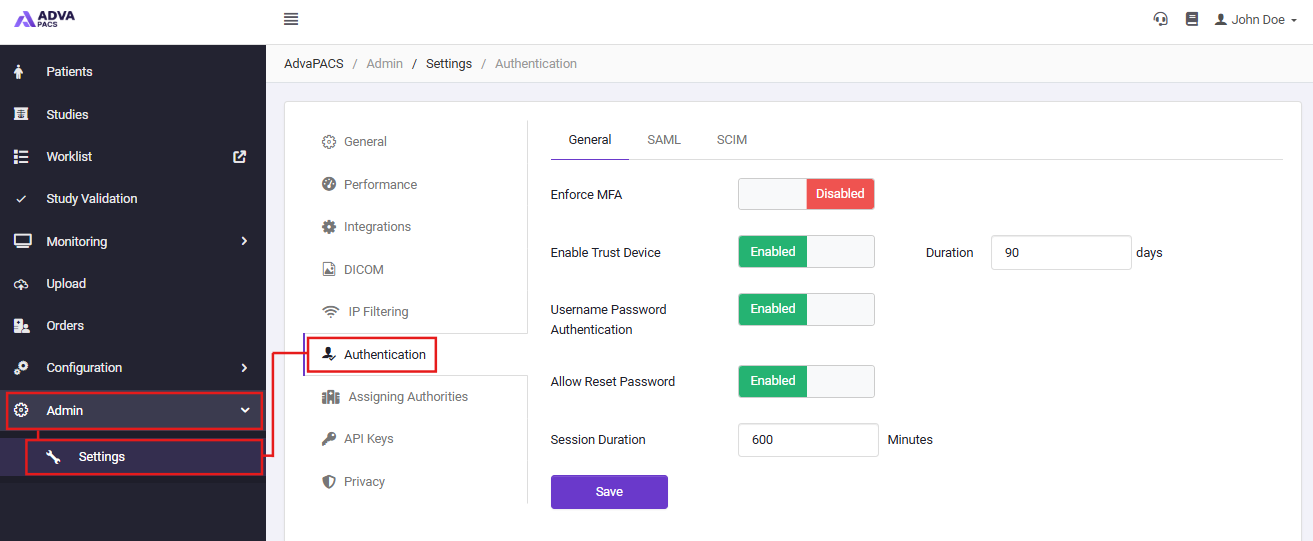
To access the Authentication settings, navigate to Admin → Settings → Authentication.
General
The General tab contains the core authentication and session management settings used by all users.
| Setting | Description |
|---|---|
| Enforce MFA | Requires all users to configure and use Multi-Factor Authentication when signing in. When disabled, users can sign in using their configured authentication method without MFA. |
| Enable Trust Device | Allows users to mark a device as trusted after successfully completing MFA. Trusted devices can bypass MFA for the configured duration. |
| Trust Device Duration | Specifies how long a trusted device remains valid before MFA is required again. The value is configured in days. |
| Username Password Authentication | Enables or disables standard username and password authentication. This should only be disabled if all users authenticate through an external identity provider. |
| Allow Reset Password | Allows users to reset their password using the Forgot Password functionality on the login page. |
| Session Duration | Specifies how long a user session remains active before the user is automatically signed out. The value is configured in minutes. |
Changes to authentication settings may affect all users in your AdvaPACS environment. Review your configuration carefully before saving changes.
SAML
The SAML tab allows AdvaPACS to integrate with a SAML 2.0 compatible Identity Provider (IdP), enabling users to authenticate using your organisation's existing identity management platform. When SAML is enabled, users can authenticate using their organisation's credentials instead of a local AdvaPACS username and password.
For information regarding set up via Single Sign On, please refer to our SSO page.
SCIM
The SCIM tab provides configuration for System for Cross-domain Identity Management (SCIM). SCIM enables external identity providers to automatically provision, update, and deprovision user accounts in AdvaPACS, helping keep user accounts synchronised with your organisation's directory service.
For information regarding set up via Single Sign On, please refer to our SSO page.