Support
If you need assistance with AdvaPACS, our support team is here to help. You can submit support requests through the AdvaPACS Support Portal, where you can track the progress of your requests and communicate directly with our support team. You can also check the AdvaPACS Status Page for information about any known incidents or service disruptions.
Support Portal
The AdvaPACS Support Portal 🡕 is the central location for managing your support requests. After submitting a request, you can return to the portal at any time to monitor its progress and communicate with our support team.
To create a new support request:
- Click the Support icon in the top-right corner of AdvaPACS.
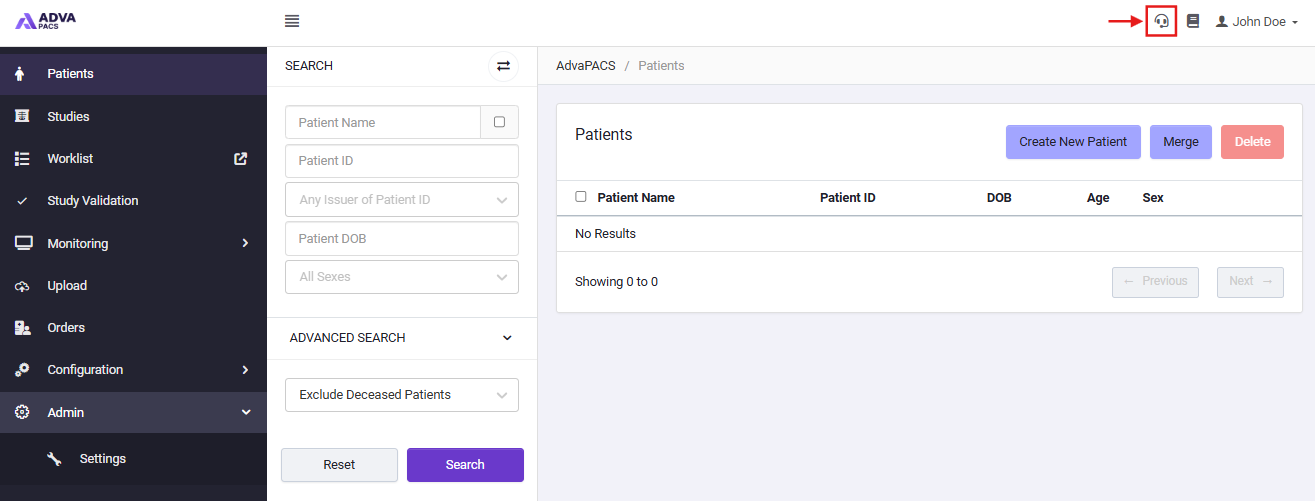
- You will be redirected to the AdvaPACS Support Portal, where you can select the type of request you would like to submit.
- Complete the support request form with as much detail as possible:
- Email Confirmation To: Enter your email address to receive updates and responses regarding your request.
- Summary: Provide a short, descriptive title for your issue or request.
- Description: Describe the issue in detail, including the steps that led to it and any relevant information.
- Priority: Select the urgency level of your request. Our support team will prioritize and respond accordingly.
- Components or Products: Indicate which AdvaPACS feature, function, or module the issue relates to.
- If applicable, attach screenshots or related files to help our team investigate the issue more efficiently.
- Once you have completed the form, click Submit.
Our support team will review your request and contact you if any additional information is required. You will receive an email confirmation once your request has been created, and you'll continue to receive email notifications as updates are added to your ticket. You can also view and respond to your request at any time through the AdvaPACS Support Portal.
Choosing the appropriate priority helps our support team assess the impact of your request and respond accordingly.
- P1 – Critical: Core functionality is unavailable, patient safety is at risk, and no workaround exists.
- P2 – High: System is operational but major functionality is affected, and no workaround exists.
- P3 – Medium: The issue has limited impact, and a workaround is available.
- P4 – Low: Minimal or no operational impact.
Selecting a higher priority than the issue warrants may delay the triage of genuinely critical incidents. If you're unsure which priority to choose, select the option that best reflects the business impact of the issue.
Phone Support
If you require urgent assistance, you can contact the AdvaPACS Support team by phone using the number for your region.
- Australia: 1300 358 060
- New Zealand: 0800 700 091
- Singapore & International: +65 3129 3700
- Malaysia: +60 3 6043 1525
- United States & Canada: +1 888 701 6125
AdvaPACS Status Page
The AdvaPACS Status Page provides current information about the availability of AdvaPACS services. You can use the status page to:
- View active incidents.
- Check planned maintenance.
- Review recent incident history.
- Subscribe to service updates.
Visit status.advapacs.com 🡕 to view the latest service status and subscribe for updates.