Assigning Authorities
Introduction
Assigning Authorities define the source or owner of an identifier within AdvaPACS. They are used to distinguish identifiers that may have the same value but originate from different systems, organisations, or facilities.
Assigning Authorities are commonly used with Patient IDs, Accession Numbers, and other identifiers exchanged through DICOM, HL7, and FHIR integrations. Configuring them correctly helps ensure studies, patients, and orders are matched accurately and prevents identifiers from different systems from conflicting.
Enabling Assigning Authorities is a permanent change for your AdvaPACS tenant. While the feature itself cannot be turned off once enabled, individual Assigning Authorities can still be managed and removed if they are no longer required.
Adding Assigning Authorities
-
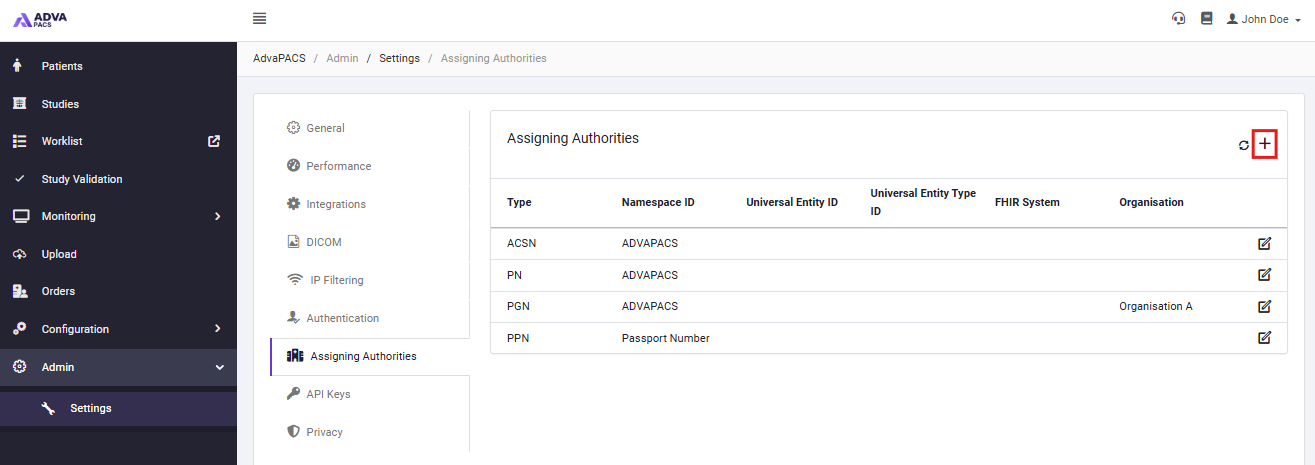
Navigate to Admin -> Settings.
-
Click on the Assigning Authorities tab.
-
Click the "+" symbol to add a new Assigning Authority.
-
Fill in the relevant information for the authority:
- Type – Selects the type of identifier this Assigning Authority will be used for (for the various types AdvaPACS support, please see below).
- Namespace ID – The unique name used to identify the Assigning Authority. This should match the value sent by your external systems.
- Universal Entity ID – A globally unique identifier for the Assigning Authority.
- Universal Entity Type ID – Specifies the format of the Universal Entity ID, such as ISO, UUID, or URI.
- FHIR System – The FHIR identifier system (
Identifier.system) associated with this Assigning Authority. - Organisation – The organisation that this Assigning Authority belongs to.
-
Click Add to add the new Assigning Authority to your Tenant.
Assigning Authority Types
The Type determines what kind of identifier the Assigning Authority represents. This value is used by AdvaPACS when processing identifiers from HL7, DICOM, and FHIR integrations. Select the type that matches the identifier issued by your external system.
| Type | Relates To | Description |
|---|---|---|
| MR | Patient | Medical Record Number (MRN). |
| NI | Patient | National Unique Individual Identifier. |
| NNxxx | Patient | Country-specific national identifier. For example, NNSGP, NNMYS. |
| PI | Patient | Patient Internal Identifier assigned by a local system. |
| PN | Patient | Person Number assigned to an individual. |
| PPN | Patient | Passport Number. |
| PT | Patient | Patient External Identifier assigned by another organisation. |
| PGN | Patient | Person Global Identifier assigned to an individual. |
| ACSN | Order | Accession Number used to identify an imaging order or request. |
| PLAC | Order | Placer Order Number assigned by the system that created the order. |
| FILL | Order | Filler Order Number assigned by the system fulfilling the order. |
| VN | Encounter | Visit Number identifying a patient encounter or visit. |
| DN | Practitioner | Doctor Number identifying a healthcare provider. |
| PRN | Practitioner | Provider Number identifying a healthcare provider. |
| UPIN | Practitioner | Universal Physician Identification Number. |
| RI | Resource | Resource Identifier for equipment, locations, or other resources. |
| U | General | Unspecified identifier type. |